Monitoring ASP.NET Application
Introduction:
There are times when you may need
to monitor your ASP.NET application's CPU and memory
consumption, so that you can fine-tune your ASP.NET
application(whether Web Form, MVC or WebMatrix). Also,
sometimes you may need to see all the exceptions(and their
details) of your application raising, whether they are
handled or not. If you are creating an ASP.NET application
in .NET Framework 4.0, then you can easily monitor your
application's CPU or memory consumption and see how many
exceptions your application raising. In this article I will
show you how you can do this.
Description:
Update: This package is now available on NuGet. To install this, just type Install-Package MonitorAspNetApplication in the Package Manager Console
With .NET Framework 4.0, you can turn on the monitoring of CPU and memory consumption by setting AppDomain.MonitoringEnabled property to true. Also, in .NET Framework 4.0, you can register a callback method to AppDomain.FirstChanceException event to monitor the exceptions being thrown within your application's AppDomain. Turning on the monitoring and registering a callback method will add some additional overhead to your application, which will hurt your application performance. So it is better to turn on these features only if you have following properties in web.config file,
1 |
<add
key="AppDomainMonitoringEnabled"
value="true"/>
|
2 |
<add
key="FirstChanceExceptionMonitoringEnabled"
value="true"/>
|
In case if you wonder what does FirstChanceException mean. It simply means the first notification of an exception raised by your application. Even CLR invokes this notification before the catch block that handles the exception. Now just update global.asax.cs file as,
01 |
string
_item = "__RequestExceptionKey";
|
02 |
protected
void
Application_Start()
|
03 |
{
|
04 |
SetupMonitoring();
|
05 |
}
|
06 |
07 |
private
void
SetupMonitoring()
|
08 |
{
|
09 |
bool
appDomainMonitoringEnabled,
                                  firstChanceExceptionMonitoringEnabled;
|
10 |
bool.TryParse(ConfigurationManager.AppSettings["AppDomainMonitoringEnabled"], out
appDomainMonitoringEnabled);
|
11 |
bool.TryParse(ConfigurationManager.AppSettings["FirstChanceExceptionMonitoringEnabled"], out
firstChanceExceptionMonitoringEnabled);
|
12 |
if
(appDomainMonitoringEnabled)
|
13 |
{
|
14 |
AppDomain.MonitoringIsEnabled = true;
|
15 |
}
|
16 |
if
(firstChanceExceptionMonitoringEnabled)
|
17 |
{
|
18 |
AppDomain.CurrentDomain.FirstChanceException
                                  += (
object
source, FirstChanceExceptionEventArgs e)
                                  =>
|
19 |
{
|
20 |
if
(HttpContext.Current == null)// If no context available, ignore it
|
21 |
return;
|
22 |
if
(HttpContext.Current.Items[_item] == null)
|
23 |
HttpContext.Current.Items[_item] = new
RequestException { Exceptions = new
List<Exception>() };
|
24 |
(HttpContext.Current.Items[_item] as
RequestException).Exceptions.Add(e.Exception);
|
25 |
};
|
26 |
}
|
27 |
}
|
28 |
protected
void
Application_EndRequest()
|
29 |
{
|
30 |
if
(Context.Items[_item] != null)
|
31 |
{
|
32 |
//Only add the request if atleast one
                                  exception is raised
|
33 |
var reqExc = Context.Items[_item] as
RequestException;
|
34 |
reqExc.Url = Request.Url.AbsoluteUri;
|
35 |
Application.Lock();
|
36 |
if
(Application["AllExc"] == null)
|
37 |
Application["AllExc"] = new
List<RequestException>();
|
38 |
(Application["AllExc"] as
List<RequestException>).Add(reqExc);
|
39 |
Application.UnLock();
|
40 |
}
|
41 |
}
|
Here is the simple RequestException class,
1 |
public
class
RequestException
|
2 |
{
|
3 |
public
string
Url { get; set; }
|
4 |
public
List<Exception> Exceptions { get; set; }
|
5 |
}
|
Now browse to Monitoring.cshtml or Monitoring.aspx file, you will see the following screen,
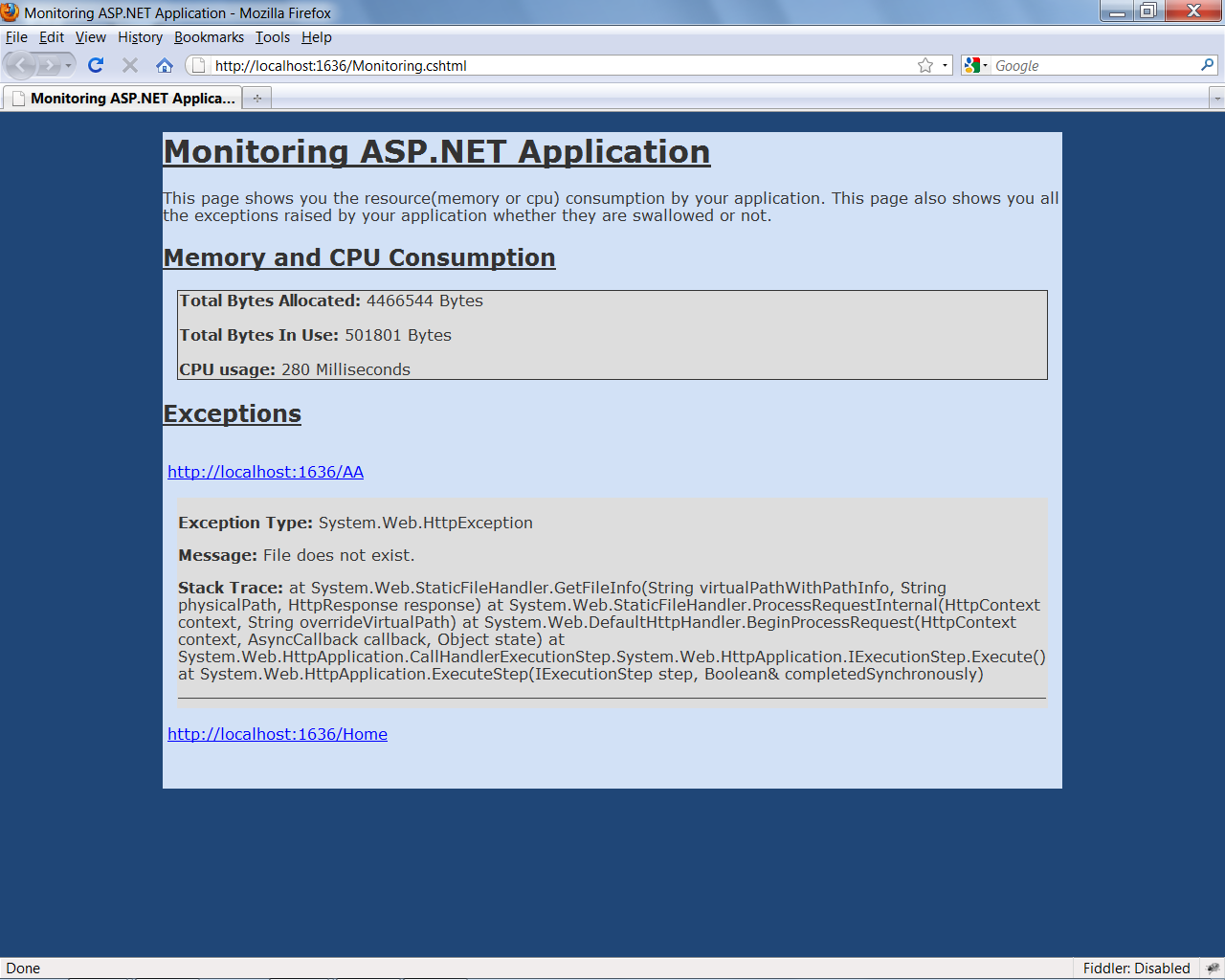
The above screen shows you the total bytes allocated, total bytes in use and CPU usage of your application. The above screen also shows you all the exceptions raised by your application which is very helpful for you. I have uploaded a sample project on github at here. You can find Monitoring.cshtml and Monitoring.aspx file on this sample project. You can use this approach in ASP.NET MVC, ASP.NET WebForm and WebMatrix application.
Summary:
This is very important for
administrators/developers to manage and administer their web
application after deploying to production server. This
article will help administrators/developers to see the
memory and CPU usage of their web application. This will
also help administrators/developers to see all the
exceptions your application is throwing whether they are
swallowed or not. Hopefully you will enjoy this article too.