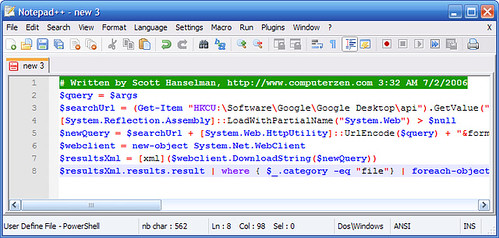
PowerShell Language Definitions for Notepad++
I saw
a request on the Notepad++ forums
today to add PowerShell syntax support.
Notepad++
has a pretty good extension system for adding user defined
languages, so I went ahead and put on together. You can grab
it from the
Notepad++ download area (zip download). Installation information is in the
included readme file - you extract the zip, rename a file,
and drop it in your %APPDATA%\Notepad++\ directory.1
I've submitted a patch
to get it included in a future Notepad++ release.
The patch has been accepted; it's available for download
from the Notepadd++ site.
The PowerShell API is very discoverable -
you can get a list of all supported PowerShell commands
by running the command "get-command" with no parameters.
Similarly, you can get a list of all command aliases by
typing "get-alias". I also threw in all the standard WMI classes and the
basic PowerShell operators and syntax based on the online
documentation. You can read my
walkthrough of adding a User Defined Language to
Notepad++
if you'd like more info on the process involved.
I'm thinking this might be helpful for occasional quick edits. For a real PowerShell editor, I highly recommend PowerShell Analyzer.
1The only gotcha there is if you've already added
a user defined language for Notepad++, in which case you'll
need to merge the files.