Roland Weigelt
Born to Code
-
GhostDoc 1.2.0 released
Version 1.2.0 originally was planned to contain mostly new rules; but it turned out that many of the planned rules require some kind of individual customization/configuration, so this had to be taken care of first. Internally, this release now does use configuration settings for each rule (e.g. templates for the generated texts), but the dialogs for actually editing these settings have not been implemented yet (they will be part of a 1.3.0 release). From a user's point of view, version 1.2.0 contains some important bug fixes and new rules for handling properties and methods with names starting on "Is", "Has" and "Can".
Download: on the GhostDoc homepage
Note for users of version 1.1.2
During setup, GhostDoc upgrades configuration settings of previous version (stored in the file "Weigelt.GhostDoc.gdc"). Usually this file is located in the GhostDoc installation directory, but due to a bug in version 1.1.2 the file was stored in the root directory of one of your hard drives.
If you have made changes when using version 1.1.2 that you want to keep, you can import the old settings using the "import" feature on the configuration dialog (see the help file for more information), then delete the ".gdc" file in the root directory.
What's New:
- Added: New rules for handling method names starting with "Is", "Has" or "Can".
- Added: New rule for handling property names starting with "Is" or "Has".
- Added: Internal changes in preparation for rules to be configurable individually (affecting e.g. import/export) in future versions.
- Changed: During the setup phase, importing and upgrading configurations can now be distinguished(button and window title renamed).
- Fixed: Editing the adjectives for the "of the" reordering does not enable the "Apply" button; pressing the "OK" button does not store the changes. If anything else is modified in the configuration dialog, the changes will be stored correctly.
- Fixed: Configuration file is stored at the wrong location (root of the installation drive). This bug was introduced in 1.1.2.
- Fixed: GhostDoc can be affected by installing other add-ins, sometimes setup dialogs are shown again when Visual Studio is started.
-
GhostDoc 1.1.0 released
A new version of GhostDoc, the winner of Roy Osherove's Visual Studio add-in contest, is available - finally! Some bugfixes, some new features, an all-new help file, some eye-candy... but the most important work was done on turning a contest entry (with some corners cut to meet the deadline) into a stable foundation for the coming versions. To have this whole thing manageable, I pretty early on decided to push most of my ideas and the feature requests of users to version 1.2.0 -- looking back, a wise decision as finishing 1.1.0 turned out to be pretty painful.
Download: on the GhostDoc homepage (Edit 2004-08-31: removed link to a specific version)
First Steps
- Install the MSI
- Start Visual Studio to complete the setup
After installation, the Windows start menu contains a sub-menu "Programs -> Weigelt -> GhostDoc" with shortcuts to the help file and the demo project.
If you hate reading manuals, you should at least take a look at "How do I see some action without reading boring stuff?" -- the link to that topic is on the start page of the help file ;-)
What's New:
- Added: Configuration dialog for acronyms and words involved in reordering operations happening when sentences are generated from identifier names (e.g. "of the", "no the" words).
- Added: Import/Export of settings (on the configuration dialog).
- Added: Help file and help in dialogs.
-
Changed:
The "of the" reordering now checks for certain
adjectives affecting "of the" trigger words and
takes them into account while reordering.
Example: If "size" is configured as an "of the" trigger word and "initial" as an adjective, then "initialPageBufferSize" will be translated to "initial size of the page buffer" instead of "size of the initial page buffer" (as in Version 1.0x). In contrast, "primaryPageBufferSize" will still be translated to "size of the primary page buffer" (because "primary" is not on the list). - Changed: The rule for method names consisting of only one word now checks for parameters and adjusts the generated doc comment accordingly ("<Verb> this instance." for methods without parameters, "<Verb> the specified <first param text>." of methods with parameters.).
- Fixed: Bug in the automatic detection of acronyms -- words consisting of consonants and only one vowel at the start of the word (e.g. "Add") were classified as acronyms.
- Fixed: Bug in the handling of all-uppercase words in identifiers -- the words (e.g. ID) were split into single characters.
- Fixed: Bug when documenting properties in interfaces -- XML documentation comment didn't appear (reason was a fat bug in Visual Studio's CodeDOM; I'll have to check whether this still exists in VS2005 as soon as I get the copy I ordered at Microsoft).
-
Feels like Christmas...
...and these are just some of the prizes I've won:

The software prizes were distributed via internet and thus are kinda hard to show (and a CD-R isn't that spectacular to look at), but are really cool. And another book is still on its way -- winning stuff is fun!
-
1st Place for GhostDoc !!!
Wow... what a way to start into the weekend... GhostDoc was voted the #1 Addin in Roy's Addin Contest! If you haven't tried it yet, why not download it and give it a whirl. There's even a "how do I see some action without reading boring stuff" demo included. After installing the MSI, simply open the program menu -> Weigelt -> GhostDoc and read the quickstart document for the few steps necessary.
Right now I'm busy preparing 1.10; I don't know when it will be ready for release (working on a CHM help file can chew up enormous amounts of time), but it shouldn't be that far away. The feature set is frozen and I'll touch the code only if a serious bug is found in 1.02. Note that funny results of the text generation don't count as a bug ;-)
I have a huge list of improvements waiting for 1.20 and later (e.g. generation rules for virtual "On..." methods), but first I want a clean release of 1.10.
-
WinXP SP2 - How to Replace Notepad.exe
Installing SP2 brought back good ol' Notepad... what a shock. So I performed my usual steps for replacing Notepad with Florian Balmer's excellent Notepad2:
-
Create backup copy of
c:\WINDOWS\notepad.exe - Change Explorer view options to show system files
-
In temporary folder: Prepare new
notepad.exe. - Copy the EXE into the clipboard
-
Open folder
C:\WINDOWS\system32\dllcachein Explorer - Ctrl-V, Backspace
- Ctrl-V, Backspace
- Ctrl-V, Backspace
- Answer the "insert WinXP CD" dialog so Notepad won't be reverted to the original version.
But this time the dialog didn't appear and after a few seconds Notepad was changed back to the original (huh, what original? Didn't I just overwrite the version in the dllcache directory?).
Well, with SP2 there's a
Notepad.exeinC:\WINDOWS\ServicePackFiles\i386that will overwrite the replaced versions. After creating a backup copy ofC:\WINDOWS\ServicePackFiles\i386\Notepad.exeand replacing this file with the new EXE I tried to replace Notepad again -- with success (even though no dialogs appeared).Update 2007-07-31: My colleague Jens Schaller has posted a how-to for replacing Notepad on Windows Vista.
-
Create backup copy of
-
"Edit in Notepad" Entry in Explorer Context Menu
Busy preparing version 1.10 of GhostDoc, I'm currently writing the help file (CHM). I haven't spent much time yet on looking for a help authoring tool, so I'm using the HTML Help Workshop which is fully sufficient for the few pages I want to combine in a CHM file. It's one of those "it works, but man who designed the GUI" tools, and some things are done definitely faster when editing the .hhk, .hhp or .hhc file in Notepad (I'm using Florian Balmer's Notepad2 as a replacement).
I have a shortcut to Notepad in my "Send to" for quite some time now, but recently I got really tired moving my mouse from the top of the explorer context menu to the "Send to" menu over and over again. Fortunately, writing a small registry hack for creating an "Edit in Notepad" entry near the top of the context menu is trivial, here's the .reg file:
Windows Registry Editor Version 5.00

[HKEY_CLASSES_ROOT\*\shell\Edit in Notepad]

[HKEY_CLASSES_ROOT\*\shell\Edit in Notepad\command]
@="notepad.exe \"%l\"" -
VS2005 Color Scheme / XML Doc Comments : Who's Idea Was That?
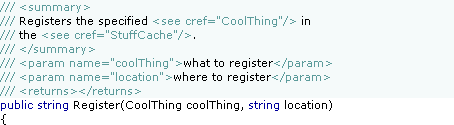
This is what XML doc comments look like using my current color scheme in Visual Studio 2003:
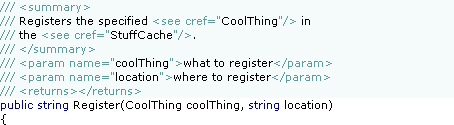
When I took a quick first look into the "Fonts and Colors" options of Visual Studio 2005 I was delighted to see a new setting "XML Doc Attribute", so I was hoping to be able to configure something like this:
But actually this is what it looks like in Visual Studio 2005 Beta 1 (Express):
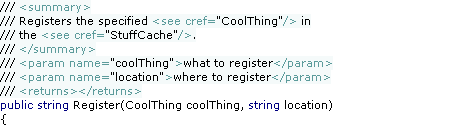
Umm, this is not what I would call an improvement. I can live with the change of the color of the "///"; personally I like the old version better as I think it's less distracting when reading the doc comment, but I'll get used to the new version.
But what on earth happened to the background color? Visual Studio 2002 and 2003 was perfectly fine. Who came up with the idea to change the behavior behind the last character of the line? Did some customer actually complain about this so it had to be "fixed"? Could somebody please explain the benefits of the new version?
With the old version, the methods were nicely divided by the doc comments:
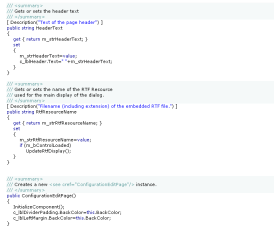
Why would anybody now choose a different background color for a doc comment at all? This is so frustrating. This is one of those issues that has a low priority compared to the other "really important" ones, so it's likely not to be fixed for the final. And the next chance for a fix is years away. That hurts. Sorry guys, you just broke my heart.
But anyway, I'll give my feedback, maybe there's still a slight chance...
Update (2004-07-29): My feedback (FDBK12464) has been declared to be a duplicate of FDBK10617 and thus has been "resolved". These two feedbacks describe related, but different issues, so I can only hope that my feedback has been understood correctly.
-
Add-in Contest Website Live, GhostDoc Now Available
The contest results are not finalized yet, but the official website went live [via Roy]. All add-ins entered in the competition can now be downloaded, GhostDoc is available here.
Edit 2004-08-14: I've disabled the download link that was pointing to version 1.01; the most recent version can be downloaded from the GhostDoc website.
-
ReadOnlyRichTextBox
Writing texts for dialog boxes can be a pretty time-consuming task. When using only label controls, the constant tweaking of both wording (resulting in longer or shorter sentences, words wrapping in different ways) and overall text layout will drive you mad sooner or later.
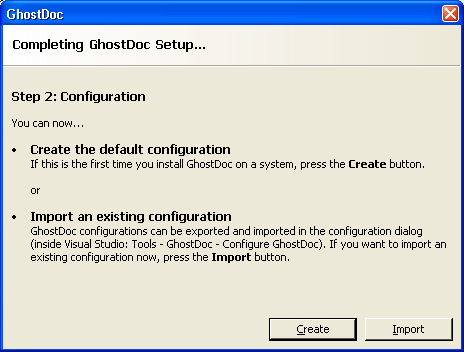
For my Visual Studio add-in GhostDoc I needed a couple of dialogs like this one:
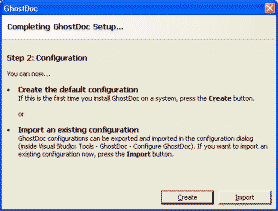
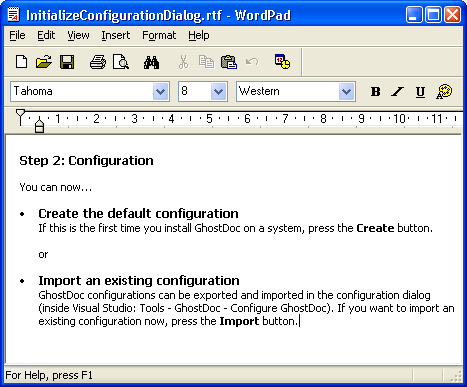
As the text between the header and the buttons was very likely to be tweaked over and over again, I decided right from the start to use a RichTextBox control (border removed, background color set to the form's background color) and write the text in Wordpad:
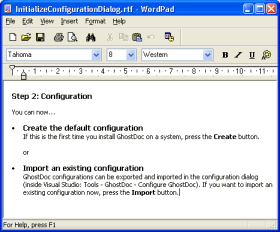
(I chose RTF over HTML because of the speed and ease of use of the RichTextBox on a Winform dialog).
To make things look a bit more professional it has to be made sure that the content of the RichTextBox can be neither edited (easy, that's what the ReadOnly property is for) nor selected (just a bit more complicated). I wrote a control derived from RichTextBox called ReadOnlyRichTextBox that does a pretty good job at doing just that; the actual code is pretty simple:
using System;
using System.Windows.Forms;
using System.ComponentModel;
namespace Weigelt.Windows.Forms
{
    public class ReadOnlyRichTextBox : RichTextBox
    {
        protected override void OnGotFocus(EventArgs e)
        {
            // no call of  base.OnGotFocus(e);
            this.Parent.Focus();
        }
        protected override void OnEnter(EventArgs e)
        {
            // no call of base.OnEnter(e);
            this.FindForm().SelectNextControl(this,true,true,true,false);
        }
        [ DefaultValue(true) ]
        public new bool ReadOnly
        {
            get { return true; }
            set { ; }
        }
        [ DefaultValue(false) ]
        public new bool TabStop
        {
            get { return false; }
            set { ; }
        }
        public ReadOnlyRichTextBox()
        {
            base.ReadOnly=true;
            base.TabStop=false;
            this.SetStyle(ControlStyles.Selectable, false);
        }
    }
}
This control drives away any attempt to focus or select it. In order for this to work correctly, the ReadOnlyRichTextBox needs at least one other control on the form (for the SelectNextControl). As this is not actually a huge problem, I didn't spend time on finding an alternative solution.
You can download the code and a small demo here.
-
One Year of Blogging
I just can't believe that a whole year has passed. I still remember how I gave the whole blogging thing a long thought; I was a bit afraid of ending as one of those "Hi, I'm X and I'm going to write about Y, so stay tuned" bloggers never to be heard of. Well, at least I managed 1 year.
Looking back, these were my more popular articles, which generate feedback even now, many months later:
- When your WinForms UserControl drives you nuts
- Visual Inheritance - How to escape Layout Hell
- Visual Inheritance Revisited
My "Wouldn't it be cool" articles also seem to be pretty popular.
Ok, the amount of feedback I get (via comments, or via email) may seem laughable compared to what some of the "big guys of blogging" receive, but it's enough to keep me motivated. And that at least a few people have me on their blog roll makes me feel a tiny little bit proud.
So... let's see whether I can manage another year ;-)