Roland Weigelt
Born to Code
-
XML Documentation Comments (Wouldn't it be cool, part 4)
Each time I implement an interface or override methods in a derived class, I have to copy XML documentation comments for methods and properties manually. This is quite annoying - especially for interfaces, considering the fact that VS.Net 2003 has this cool feature of creating the outline of an interface implementation automatically. So why not create the documentation comments as well?
Note that I don't want the original documentation referenced using some sort of complicated mechanism. Just Copy and Paste - in many cases the documentation should be tweaked anyway (at least if you want to write readable documentation; who doesn't hate those generic sentences describing "actions" that are "performed" on "items")
Man, this is something I really would like to see in a future version of VS.Net.
-
Nice WinXP Style Icons for Customizing Folders
For quite some time I had planned to set up my home machine from scratch; last weekend I finally bit the bullet and did it. One week later I'm still in the "add and tweak" phase (the days after a re-installation when you notice some tools/hotkeys/settings are missing), but things are on their way back to normal.
While configuring my system I played around with customizing folder icons in Windows Explorer ("Customize" tab on a folder's property dialog). Nice feature -- if you have icons matching the look of your system. Searching the web for folder icons I noticed that people seem to be obsessed with changing the look of their GUI completely, often to a point where I can only wonder whether these systems are used for any actual work...
If you're looking for some "Standard Windows XP" folder icons for typical document types, you should visit Foood's Icons. The folder icons can be downloaded on this page under "XP Folders (1,2,3, 4 & 5)".
-
Nasty little Difference between "Find" and "Find in Files" in VS.Net 2003
I'm a keyboard shortcut junkie; at the same time there's a large variation of how fast I pick up a hotkey. While I used Ctrl-F / Ctrl-H (find / find and replace) and Ctrl-Shift-F / Ctrl-Shift-H (find / find and replace in files) for what seems like ages, I only recently started using Alt-F / Alt-A (find next / replace all) in the Find dialog -- don't ask me what took me so long...
Now sometimes you simply use the wrong shortcut, especially if it's pretty new for you and not completely burnt into your brain. Maybe you're tired or distracted or whatever.
So what happens if you hit Alt-A (replace all) in a Find dialog? Nothing, because there's no button "Replace All" in this dialog. Sounds reasonable.
But what happens if you hit Alt-A in a "Find in Files" dialog? Well... it replaces everything you wanted to find with some text you entered in the "Replace in Files" dialog five minutes ago!
Fortunately I had the "keep modified files open" option checked, so could use Undo...
-
GhostDoc Delay
As the public interest regarding GhostDoc was next to zero (which isn't necessarily a bad thing at this phase of the project), I've done a quiet release of version 0.9, available only to some of my colleagues at work. The overall reaction was very positive and a lot of "cool, I want more" ideas poured in which showed that they did "get" what GhostDoc is about. Unfortunately, when planning the future direction for GhostDoc, it became pretty obvious that the way the rules for method and properties are currently defined is a dead-end.
So I have decided that there will be no public release of version 0.9. I will completely rework GhostDoc towards a more extensible architecture, even if this means I have to throw away a lot of work done in January. No idea how long this will take, but I try to make several small steps to minize the risk of getting carried away. More details will follow later.
-
GhostDoc has reached Dogfood Status
A lot has happened since my last GhostDoc related posting. The addin version of GhostDoc is pretty close to a first public release. I'm already using it both at home and at work, but it's a bit complicated to keep the two configurations in sync. It's not really rewarding to define more specialized rules if you can't move them to a different machine. So I've decided to delay the release until some very basic import / export functions are implemented. They will be ugly, but straightforward to use and fully sufficient for a 0.9 version.
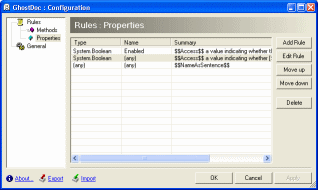
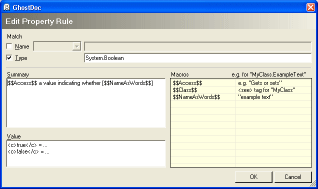
Here are two screenshots of configuration dialogs:
1. The main dialog
2. The dialog for editing a property rule:
-
Looking for a New Year's Resolution?
There are many exciting .NET topics waiting for us in 2004. Simply too much stuff to be tried and understood, too much knowledge to be gained. If you're making plans for 2004, here's one single thing I can fully recommend:
If you're not already doing it, start writing unit tests using a test framework.
Unit testing is one of these "I really should be doing this" concepts. Even though I read and heard about unit testing years ago, I only started doing it in 2003. Sure, I always had some kind of test applications for e.g. a library - who hasn't written one of those infamous programs consisting of a form and dozens of buttons ("button1", "button2", ...), each starting some test code. And it's not as if my software was of poor quality. But looking back, unit testing was the thing in 2003 that made me a better developer.
I'm using NUnit for my unit tests; it's so easy to use that a typical reaction of developers being introduced to NUnit is "What? That's all I have to do?". To get started, visit this page on the NUnit website, and follow the steps in the first paragraph "Getting Started with NUnit".
When I began writing unit tests in early 2003, I wrote tests for existing code. If this code (e.g. a library) is already successfully in use, this can be pretty frustrating, because the most basic tests are all likely to succeed. My first tests where pretty coarse, testing too much at once - maybe because the trivial tests (e.g. create a class instance, set a property and test whether reading it has the expected result) seemed like a waste of time.
In the course of time I moved more towards "test driven development", i.e. writing tests along with the code, often even before the implementation is ready. Now, if I create a new project, I always add a test project to the solution. This way my code and the corresponding tests never run out of sync. If I make a breaking change, the solution won't compile - it's that easy.
If you take this approach (writing test very early), even testing the most basic stuff can be pretty rewarding:
- Sometime typos or copy/paste mistakes are not caught by the compiler (e.g. when the property getter accesses a different member variable than the property setter) - one bug like this found by a unit test written in 5 Minutes can save you hours of debugging through a complete application.
- It's a very good test for the usability e.g. of your API. If it turns out that even a simple task requires many lines of code, you definitely should re-design your API (which is less of a problem at that early stage of development).
- The unit tests is some sort of documentation of how your code is used - don't underestimate how helpful this can be (by the way: I wrote a simple tool for generating examples for online documentation from unit tests).
- Last but not least: I know that some of the unit-testing folks don't like debuggers, but fine-grained unit tests are very good entry points for single stepping through your code.
So... what about a New Year's Resolution to start writing unit tests?
-
Dialogs are too much Stupid Code
If you develop a complicated dialog (editing non-trivial data structures, showing/hiding parts of the dialog), it usually turns out to be a lot of work until everything is working as it should - and this doesn't really surprise anyone. If you use something trivial as a OpenFileDialog or a MessageBox, you know that this is just a matter of minutes.
But what really gets on my nerves are these "simple dialogs". Imagine a dialog consisting of a couple of text fields and some checkboxes. Some text fields are disabled unless a certain checkbox is checked. And so on, I think you get the idea. Each time I have to write one of these dialogs, I...
- underestimate the actual time required to "get things right", and
- ask myself "how often did I write code similar to this?" when I move data in and out the dialog, handling OK and Cancel, enabling/disabling controls.
Sometimes I feel like a "human code generator" because there's virtually no real thinking involved when writing down the code for such a dialog.
Is this something I just have to get over with? Any ideas to keep the amount of code as low as possible?
-
My First VS.Net Addin
GhostDoc is my first VS.Net Addin. To get started, the first thing I did was to run the Addin wizard and look at the code (of course without reading any documentation...) -- and it all seemed pretty obvious. But what I couldn't find was how to define a hotkey in code. The method
AddNamedCommandhas a lot of parameters, really a lot. But where is the hotkey specified? In case anybody else is wondering: You have to set theBindingsproperty on the command object returned byAddNamedCommand.Usually I'm pretty good at finding stuff using Google, but this took me quite some time to find out. The problem was that my search dug up lots of questions and answers on how to redefine the keys using the dialog of the VS.Net IDE. The actual description of the
Bindingsproperty is completely fine, by the way, I just didn't find it at first. Maybe a comment regarding a possible key binding should be included in the code generated by the wizard. Speaking of the generated code for the addin, there's one thing I really want to know: Who came up with the name "Connect" for a class? -
GhostDoc News
My project GhostDoc is now a VS.Net Addin. But before I release the next version, there are a couple of things on my ToDo list I want to finish first:
- A rewrite of the configuration storage code
- A GUI for editing the configuration
The actual documentation generation will be the same for the next release; there are already a lot of things that can be done with the existing features, just by using the capabilities of the configuration settings.
More information on what's planned for GhostDoc after the release (no specific date yet).
-
Introducing: GhostDoc
[2004-08-22] As this old post has a pretty high Google rating, I'd like to emphasise that it does not contain up-to-date information. If you are interested in GhostDoc, I'd suggest to take a look at the GhostDoc homepage./// <summary>
/// GhostDoc is a VS.Net macro for automatically generating those
/// parts of a C# doc comment that can be deduced from the name
/// and/or type of a method or property.
/// </summary>In my previous post I already mentioned my current project "GhostDoc"; now a first public release is ready. Before I start explaining a lot of things, why don't just watch the small video showing GhostDoc in action (400k).
Now here's the basic idea for GhostDoc: When writing documentation comments (e.g. for an API) I tend to use "documentation patterns", e.g. the infamous "Gets or sets a value indicating whether" for a boolean property. And my summary often consists of what I call "method/property name as a sentence plus X", with X being something that adds some value. Example: if I have e.g. a method "void CreateDocumentBuffer(int bytes)", I write "Creates the document buffer with the specified size in bytes". Of this sentence, typing the words "Creates the document buffer" is pretty brainless labor (because I already typed the method name). So wouldn't it be cool if some macro would do that for me? Well, that's what GhostDoc is about; or to be exact, what the very first version started with.
GhostDoc works the following way: When you hit a hotkey inside the c# source editor of VS.Net, GhostDoc finds out what kind of code element the cursor is currently in (e.g. a method), determines the name and (return) type and uses these to look up a matching template for the documentation comment (the templates are stored in an XML configuration file).
The current version of GhostDoc is definitely a "technical preview". It's the result of a macro that grew bigger and bigger until it had to be supported by code in a C# assembly. Now all code is in the assembly and the macro consists only of a single method call. So GhostDoc is not (yet) a VS.Net addin. It's pretty stable; stable enough for me to use it both at home and at work. The good thing is that because of the way GhostDoc works, it simply can't mess up your source code (unless VS.Net has some serious problems) and undo works nicely, too.
Installation
The installation is currently completely manual
- Download GhostDoc_0.5.zip
- Unzip it to a directory of your choice
- Move "Weigelt.Tools.GhostDoc.dll" and "Weigelt.Tools.GhostDoc.Texts.xml" to the "Common7\IDE\PublicAssemblies" subdirectory inside your VS.Net 2003 installation directory.
- Start Visual Studio and go to the Macros IDE (Tools - Macros - Macros IDE)
- Open the MyMacros node in the project explorer
- Add a reference to the "GhostDoc macro support" assembly (it will appear automatically in the list of the "Add Reference" dialog)
- Right click "MyMacros" and "Add existing item", browsing for the "GhostDoc.vb" file in the directory you unzipped to.
- Save and leave the Macros IDE.
- Open the options dialog (Tools - Options) and define the keyboard bindings; simply type "ghost" in the "show commands containing" input field and you'll see the two commands (I use Ctrl-D for CreateComment, and Ctrl-Shift-D for RefreshConfiguration, but it's completely up to you)
Getting started
Move the cursor into a method or a property without a documentation comment, and hit e.g. Ctrl-D (if a documentation comment already exists, nothing will happen). Note that your code should use .NET naming conventions, otherwise the results can be pretty strange, sometimes even funny. GhostDoc is highly configurable, but in this version the default configuration is far from being finished. Simply take a look into the file "Weigelt.Tools.GhostDoc.Texts.xml" and you'll get an idea how things work.
Known Issues
- As already mentioned, the generated summary can sometimes be pretty off. In many cases, a new rule in the configuration will help - if you add such a rule, please send me a copy.
- There is virtually no user documentation. Some information can be found inside comments in the configuration file.
Plans for the future
- More entries in the configuration file
- A GUI for editing the configuration
- Better installation
- A release including source code, maybe opening a GDN workspace.
- ...
Update 01.12.2003: I'm now working on turning GhostDoc into a Visual Studio .NET addin. So if you're put off by the ugly installation of the current version, you may want wait just a little.